Bitcoin Cloud Mining
- 4.2
- Rating
- 10.00K
- Installs
- Free
- Price

 Analysis by App-foxy
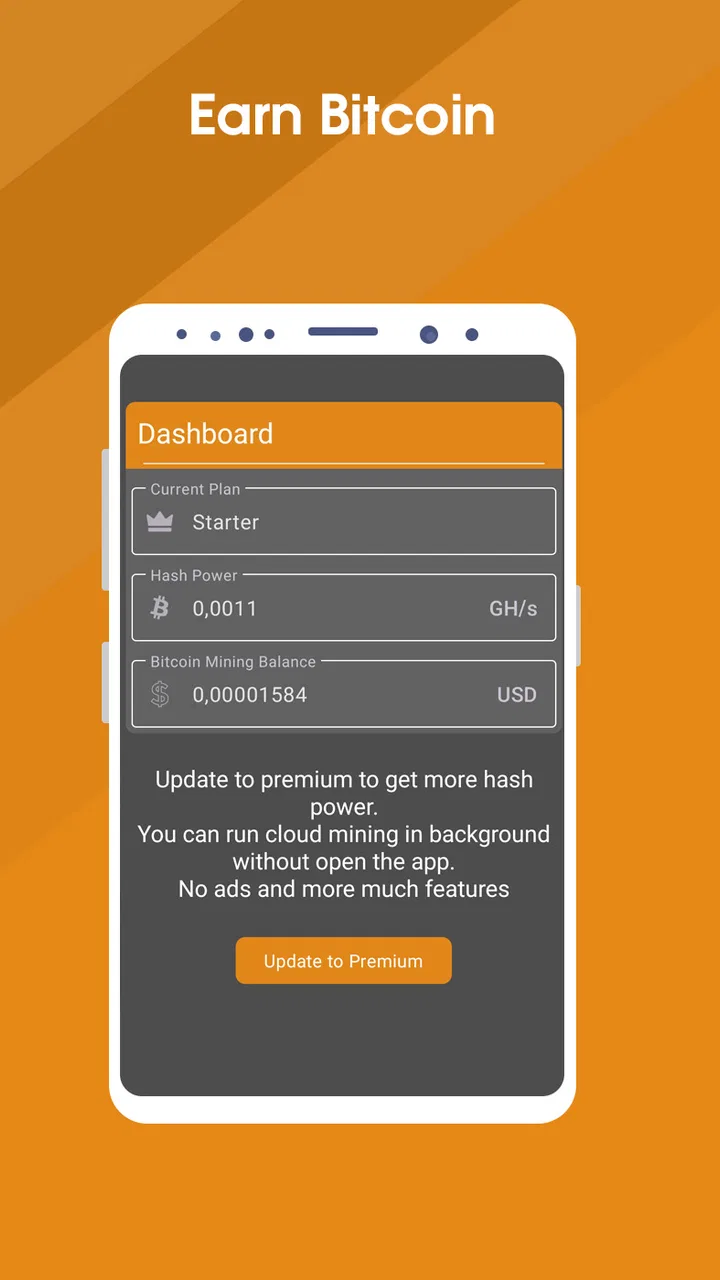
I approached Bitcoin Cloud Mining as a small household experiment rather than as a serious investment tool. The app sits in the finance category and is designed around the idea of earning bitcoin through cloud-based mining, so the appeal is easy to understand: you can explore a crypto process from a phone without buying mining hardware. My experience was more useful as an introduction to the language and workflow of digital mining than as a dependable way to build income.
That distinction matters. The app is free to install, but it includes optional purchases ranging from $4.99 to $35.99 per item. I would not treat those purchases as a shortcut to guaranteed returns. Anyone using it should first understand what the app shows, what actions are available, and how much confidence they place in a service connected with money and cryptocurrency. For me, the best way to approach it is slowly, with no expectation that a screen displaying mining activity automatically equals profit.
How it fits into a shared household
A realistic use case is a shared tablet or an older spare phone kept in the living room. One adult might install the app to learn about bitcoin mining, while another household member occasionally checks the balance or activity. That arrangement can work for casual exploration, but it creates an important boundary: the device may be shared, while the financial decisions should not be.
You May Also Like

 Blood Strike: 2.5 Anniversary
Blood Strike’s Loadouts Turn Every Drop Into a Tactical Gamble
A close look at Blood Strike’s custom loadouts: how fast access to signature weapons reshapes its battle royale rhythm, rewards preparation, and narrows the gap between fights.

 Pandora - Music & Podcasts
Pandora’s Music Is Easy to Start, but Harder to Recover
Pandora’s strength is its low-effort path from a seed to a station. Its weak spot is how much confidence it asks you to place in connection, setup, and quiet recovery.

 8 Ball Pool
 Is Built on Rivalries, Rematches, and Routine
A close look at the rivalries, rematches, shared routines, and unanswered safety questions that turn a quick pool match into a persistent mobile community.

 Samsung Music
’s Quiet Strength Is Playing What You Already Own
Its reach comes less from spectacle than from dependable access to a personal library. That simplicity is both the app’s strongest retention engine and its ceiling.

 AccuWeather: Weather Radar
AccuWeather Review: A Quick, Clear Forecast for Everyday Decisions
For everyday plans, the best forecast is the one you can understand quickly. AccuWeather makes rain timing, radar, and local conditions easy to act on, with a few trade-offs.

 Hill Climb Racing
Why Hill Climb Racing Still Turns Crashes Into One More Run
A tiny car, a bumpy hill and one more upgrade: Hill Climb Racing keeps resurfacing because its simple chaos makes every near-miss feel personal.
More From Our News Desk
View All News


I would keep the app associated with one clearly identified person. Even when the phone belongs to the whole household, a mining balance or any purchase decision should not be treated as communal money unless everyone understands who controls it. A child tapping through screens, a guest using the device, or another family member assuming the app is a game could create confusion. The interface may feel simple, but the subject is not harmless entertainment once cryptocurrency or paid options enter the picture.
For that reason, I found the app more suitable for a supervised learning session than for unattended household use. I would show a family member what the app is intended to do, explain that displayed earnings are not the same as cash in a bank account, and agree that no purchase is made without the account holder’s approval. This is especially important on a shared device where the person browsing is not necessarily the person responsible for the account.
The household scenario also highlights a practical strength. Because the concept is presented through a mobile app instead of physical mining equipment, it is easy to discuss without setting up specialist hardware, cooling, electricity management, or a dedicated workstation. Someone curious about crypto can see the general idea in a compact format. The trade-off is that convenience can make the process appear more certain and more profitable than it really is.
Starting carefully instead of chasing a balance
My preferred setup routine is deliberately cautious. I would install the app on the intended device, identify the account holder, read every screen involving mining, withdrawals, upgrades, or purchases, and only then decide whether continued use makes sense. I would also avoid handing the phone to someone else with the instruction to “just keep it running,” because that removes the chance to notice changes in the account or understand what has been selected.
The app was released on November 17, 2023, and the current version is 2.7. It supports Android 7.0 and later, which makes it accessible on many older devices. That is convenient for a spare household phone, but an older operating system can also be a reason to be more deliberate about security. I would keep the device updated where possible, use a screen lock, and avoid storing sensitive recovery information in an exposed notes app or screenshot.
There is another boundary I consider essential: never confuse the app with a wallet, exchange, or bank account simply because it appears in a finance section. A person deciding to use it should understand where any bitcoin is supposed to go, what steps are required before it can be used elsewhere, and whether a displayed figure represents an estimate, a balance, or a completed transaction. If those distinctions are unclear, I would pause rather than add money.
That approach also answers a question many first-time users have: can the app be used without paying? Yes, it is available free of charge, so you can begin by examining the basic experience rather than committing money immediately. However, free access should not be interpreted as proof of earnings. The presence of optional purchases means I would regard any paid upgrade as a separate financial decision, not as a normal requirement for simply learning how the app works.
Keeping household coordination simple
If several people want to follow the same activity, I would create a simple household rule: one person operates the account, one person records questions, and nobody buys anything without a direct conversation. This sounds basic, but it prevents the most common shared-device problem: several people believe they are “helping” while nobody has a complete view of what has changed.
A short written note can help. I would record the date of the last review, the account owner, whether any purchase has been made, and what the next action is supposed to be. I would not record passwords or private keys there. The purpose is coordination, not creating another place where sensitive information can be exposed. This is particularly useful when a household member only checks the device occasionally and might otherwise mistake an old screen for current information.
I also recommend agreeing on a stop point before using the app. For example, the household might decide that it will only be used for observation and learning, or that it will be removed if the screens become confusing or if anyone feels pressured to pay. Setting that rule in advance is more effective than making a decision after becoming emotionally attached to a rising number or a promised improvement.
For a shared phone, notifications and account access deserve attention even though I would not assume the app provides family profiles or special household controls. I would not leave the device unlocked on a public table, and I would avoid letting a child browse unsupervised. If the family wants separate financial identities, separate devices or accounts are safer than trying to divide one app session informally.
Age, trust, and the meaning of “Everyone”
The content rating is Everyone, but I would not use that label as a substitute for financial guidance. It describes broad accessibility, not financial maturity. Bitcoin, cloud mining, digital balances, and in-app purchases can be difficult concepts for younger users, even when the app itself is easy to open and navigate.
In my view, an adult should remain responsible for payment decisions and account ownership. A teenager may use the app as part of a conversation about digital assets, risk, and the difference between a simulation-like display and money that can actually be spent. A younger child should not be encouraged to interpret the app as a way to earn pocket money. That message could create unrealistic expectations and make later purchase prompts feel like a normal part of earning.
Trust is also a practical issue between adults. If one person installs the app and another person sees a balance, both should know whether it is merely being monitored or whether an external wallet, exchange, or payment step is involved. I would not share access casually, and I would explain that a bitcoin-related account may require information or actions that should remain private. The safest household arrangement is transparent about responsibility without exposing confidential details.
The developer is Music Tools Pro, which is an unusual name for a finance application and therefore something I would notice before placing confidence in the service. That does not by itself prove anything about the app’s quality or legitimacy, but it is a good reminder to check the developer identity, permissions, purchase screens, and withdrawal process carefully rather than relying on the visual impression of a mining dashboard.
What the ratings suggest, and what they do not
The app holds a 4.2 average from around 2.8 thousand ratings, with 88 written reviews and over 10 thousand installs. Those figures show that people are trying it and that the overall response is reasonably positive, but they do not answer the questions that matter most to a cautious user: whether earnings are dependable, how smooth withdrawals are, or whether paid options represent good value.
I would read written feedback for recurring details instead of looking only at the average. In particular, I would look for comments about account access, clarity of mining calculations, purchase expectations, and the practical experience of moving funds. A high average can reflect an easy interface or an interesting concept, while a user may still decide that the financial uncertainty is too great.
This is where Bitcoin Cloud Mining differs from a conventional budgeting app. A budgeting tool usually helps you organize money you already have and measure spending against a plan. This app is built around a speculative digital-asset activity, so the central question is not simply whether the interface is pleasant. It is whether the user understands the risk and the path from an in-app activity display to something with real-world value.
It also differs from owning physical mining equipment. Hardware mining involves electricity, heat, noise, maintenance, and network configuration. The mobile approach avoids that physical burden, which is its clearest convenience. But it also means the user is relying on the app’s service model rather than directly controlling machines, energy costs, or the technical environment. For someone who wants to study Bitcoin’s underlying technology, a wallet, exchange education, or a technical mining guide may be more informative.
Useful ways to test the experience
One non-obvious tip is to treat the first session as an audit, not an earning session. I would take note of what the app calls mining, where balances are displayed, whether the wording distinguishes estimated amounts from settled amounts, and what the app asks the user to do before any withdrawal. This creates a clearer mental model and makes it easier to spot a step that feels too vague.
A second useful habit is to separate time from money. I might spend a few short sessions observing the workflow, but I would not buy an upgrade simply because the app has been open for a while. Time already spent is not a reason to spend more. The optional purchase range makes this especially important: the larger option is not automatically more sensible, and the lower option is not automatically low-risk.
A third insight concerns shared expectations. If a household member says the app is “making bitcoin,” I would ask what that means in practical terms. Is the figure transferable? Is it available immediately? Is there a minimum or a process before it can leave the service? Asking those questions early prevents a family from celebrating a number that cannot yet be used or may change under conditions they have not understood.
A fourth is to keep the app away from emergency-money decisions. I would never use rent, food money, school funds, or borrowed cash for an optional purchase connected with cloud mining. Even a small payment can become a problem if the user is relying on an expected return. The app is better treated as an educational experiment with a strict spending limit of zero unless the adult account holder has independently decided that the risk is acceptable.
Who should use it, and who should skip it
I can recommend trying it to a curious adult who wants a straightforward introduction to the vocabulary of bitcoin mining and prefers a phone-based experience. It may also suit a household discussion where one person demonstrates the screens while explaining digital assets, account ownership, and financial risk. The free entry point makes that kind of cautious exploration possible.
I would not recommend it to someone seeking predictable income, a guaranteed return, or a replacement for work. I would also steer away users who do not understand cryptocurrency transactions, who are uncomfortable evaluating paid upgrades, or who cannot keep account access private. A person looking for detailed portfolio tracking should choose a dedicated investment tool, while someone focused on household budgeting will probably be better served by an app designed specifically for expenses and savings.
Parents should be especially selective. The Everyone rating makes the app broadly accessible, but it does not make unsupervised financial use appropriate. If a young person is interested, I would use the opportunity to explain that digital balances can be volatile, services can have conditions, and tapping a purchase button is a real financial action. If that conversation is not possible, I would skip installing it on a child’s personal device.
My household verdict
After looking at it through a shared-device lens, I see Bitcoin Cloud Mining as a low-commitment way to explore a crypto-mining concept, not as a household income plan. Its strongest qualities are the accessible mobile format, the free starting point, and the fact that it avoids the equipment and technical setup associated with physical mining. The main friction is the gap between a simple app experience and the complicated financial questions behind any bitcoin-related return.
I would keep it on one clearly managed device, let one adult control purchases and account decisions, and use short review sessions rather than leaving it to run as background household activity. I would also compare its workflow with a wallet, a budgeting app, or a reputable educational resource before deciding that it serves a real financial need.
The app has a 4.2 average and a growing audience, but my recommendation remains conditional. Use it to learn and inspect the process, never as a promise of easy earnings. For a careful adult who accepts that boundary, it can be an interesting finance experiment. For a family wanting shared money management, reliable returns, or child-friendly financial independence, I would choose a more transparent and purpose-built alternative.
FAQs for Bitcoin Cloud Mining
01What is Bitcoin Cloud Mining, and how does it work?
Bitcoin Cloud Mining allows users to participate in Bitcoin mining without purchasing or maintaining physical mining hardware. Instead, you typically rent mining power from a remote data center through the app. The platform uses that computing power to mine cryptocurrency and displays estimated earnings, contract details, fees, and payout information in your account. Results can vary considerably depending on market conditions, mining difficulty, contract terms, and the provider’s reliability.
02Is Bitcoin Cloud Mining free to use?
The app may be free to download, but cloud mining services are rarely completely free. Some platforms offer limited trial contracts, promotional rewards, or simulated mining features, while regular plans generally require an upfront payment or subscription. Before depositing money, carefully review maintenance fees, withdrawal charges, minimum payout limits, contract duration, and whether earnings are guaranteed. A free download should not be confused with risk-free mining.
03Can I really earn Bitcoin with Bitcoin Cloud Mining?
Potentially, but earnings are never guaranteed. Your results depend on the amount of mining power purchased, Bitcoin’s market price, network difficulty, electricity and maintenance fees, contract length, and the provider’s payout policy. During testing, the most important information to examine is whether the app clearly explains its calculation method and provides transparent transaction records. Treat projected returns as estimates rather than promises, and never invest money you cannot afford to lose.
04Is Bitcoin Cloud Mining safe and legitimate?
Safety depends largely on the company operating the service, not just the app interface. Before using it, check the developer’s identity, company registration, privacy policy, customer support, independent reviews, and evidence of real mining operations. Be cautious of guaranteed profits, pressure to recruit others, anonymous operators, unclear fees, or requests for unnecessary wallet credentials. Enable account security features and remember that cryptocurrency transactions are usually difficult or impossible to reverse.
05What should I check before downloading or paying for a cloud mining plan?
Before downloading, verify that the app comes from the official Google Play Store or Apple App Store and that its developer information matches the service’s official website. Read recent user reviews, permissions, refund rules, contract conditions, payout requirements, and privacy practices. Confirm whether withdrawals are available in your country and whether identity verification is required. Avoid modified APK files and never share your private wallet key, recovery phrase, or exchange password with the app.
Pros
- No specialized mining hardware is required.
- Mining can be managed remotely from a mobile device.
- Potentially lower entry cost than buying a full mining rig.
- Simple interface can suit users new to cryptocurrency.
- May offer access to mining plans with different durations.
Cons
- Cloud-mining returns can be difficult to verify independently.
- Fees and maintenance charges may reduce earnings significantly.
- Bitcoin payouts may be small and take time to accumulate.
- Plans can involve lock-in periods or limited withdrawal options.
- Users face platform
- cryptocurrency
- and regulatory risks.

Bitcoin Cloud Mining
Gallery